
Programming
Portal of the Town and Gmina of Stary Sącz
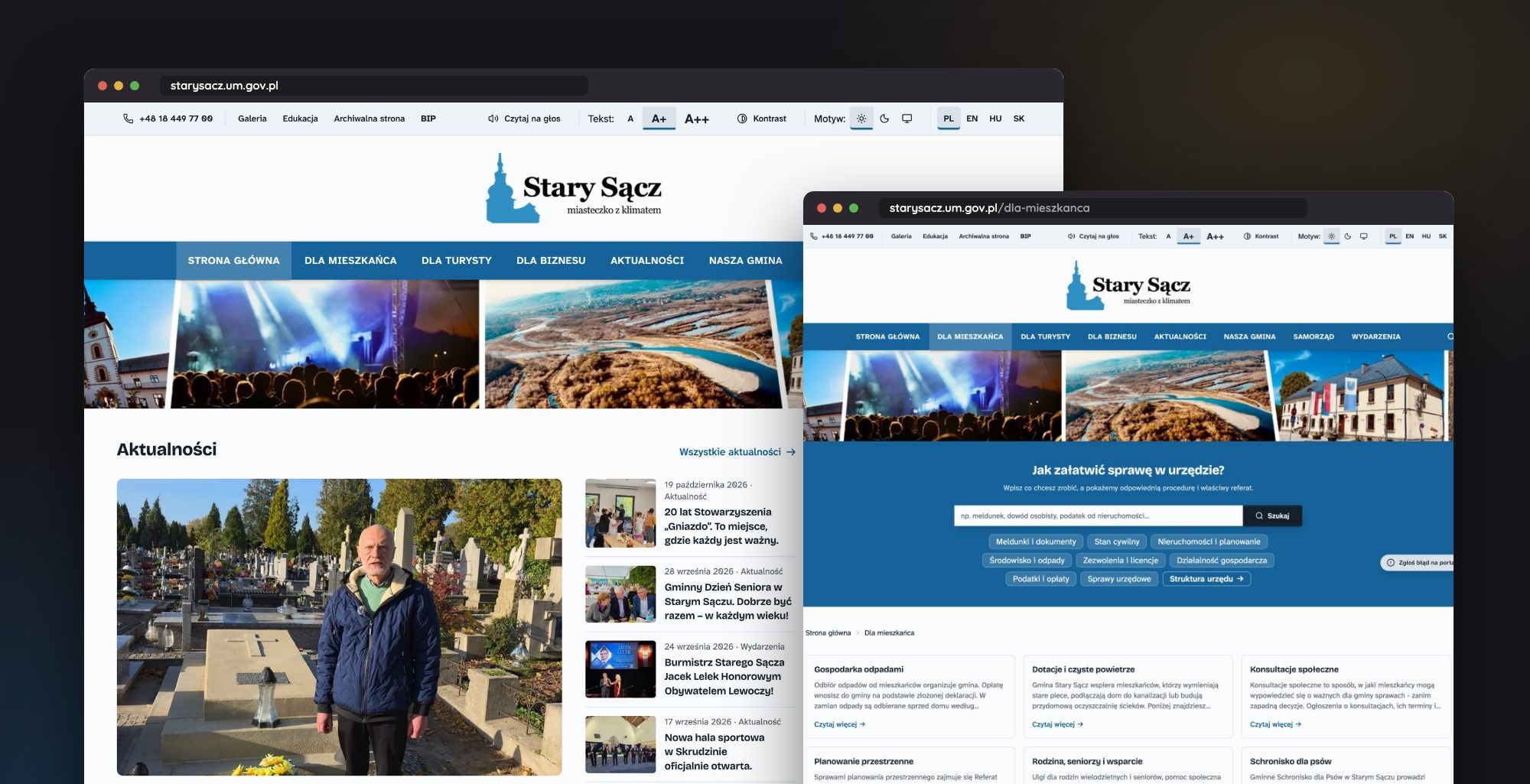
The City and Municipal Portal of Stary Sącz has been operational since October 16, 2026: a headless CMS with four language versions, WCAG 2.2 AA compliance, and GDPR adherence. Built from scratch on open-source software and hosted exclusively on the municipality's servers.
06/09/2026
I work in local government and for a long time I've been looking at our old portal with growing dissatisfaction. Eventually, I took it upon myself to build a new one: one that informs residents, guides tourists, helps take care of business at the office, and meets digital accessibility requirements.
On October 16, 2026, the new portal took over the address starysacz.um.gov.pl. It took seven months from the first commit to launch. The old WordPress site didn't disappear; it was archived instead.
From the start, I wanted independence from big corporations and cloud services, with no licensing costs at all. Instead of a ready-made turnkey system, I designed a headless architecture. A separate panel is used for content management, while a different engine generates pages for visitors.
The editors at the office get a simple interface for working with content. Residents get a page that loads quickly because it doesn't have to carry the burden of an administrative panel.
Who is this portal for
Before I started working on the first component, I listed out who actually uses this website. The municipal office serves very diverse needs under one address:
- a resident checking news, events, and waste collection schedules,
- a tourist and an investor who are looking for information in their own language,
- a municipal employee who edits content without the help of an IT specialist,
- a person with a disability for whom the screen reader simply has to work
- a local business owner who wants to report a tourist attraction themselves.
This list determined the content structure more than any graphical template.
What was included in the portal
The biggest challenge wasn't a single difficult task, but rather the scale. The portal now has over thirty modules and several dozen collections in the CMS panel. All of them need to work cohesively in four languages.
the Digital Town Hall and Search Engine
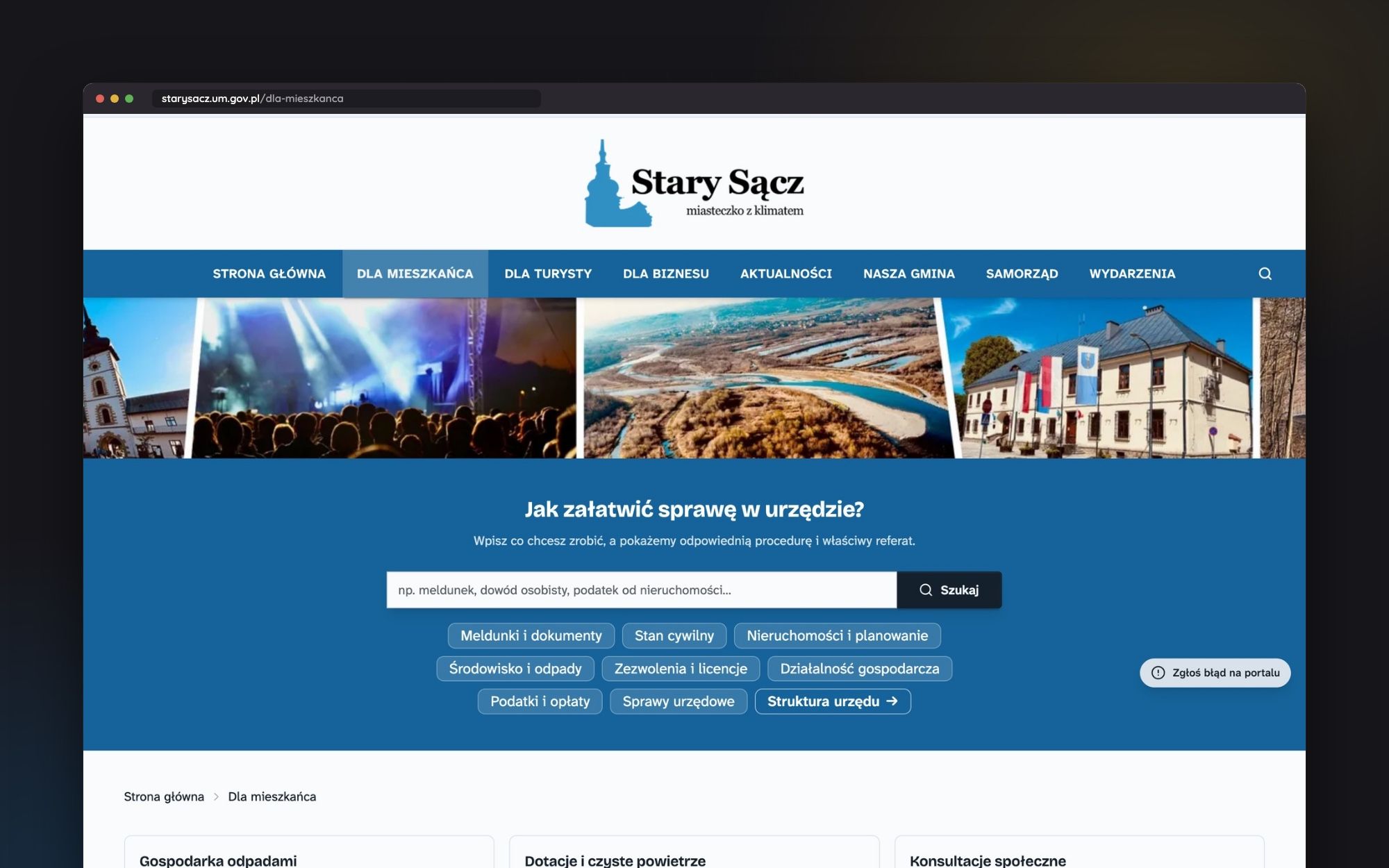
The Dla mieszkańca section begins with the question: how to handle matters at the office? Simply enter what you want to do, and the search engine will indicate the procedure and the appropriate department.
The case card includes the legal basis, required documents, fees, and downloadable forms. At the end, there is a link to ePUAP or gov.pl if the matter can be handled online.
The full-portal search engine is based on Meilisearch and provides results as you type, understanding Polish conjugation and synonyms. It searches articles, procedures, the tourist catalog, and projects simultaneously.
Tourism and Maps
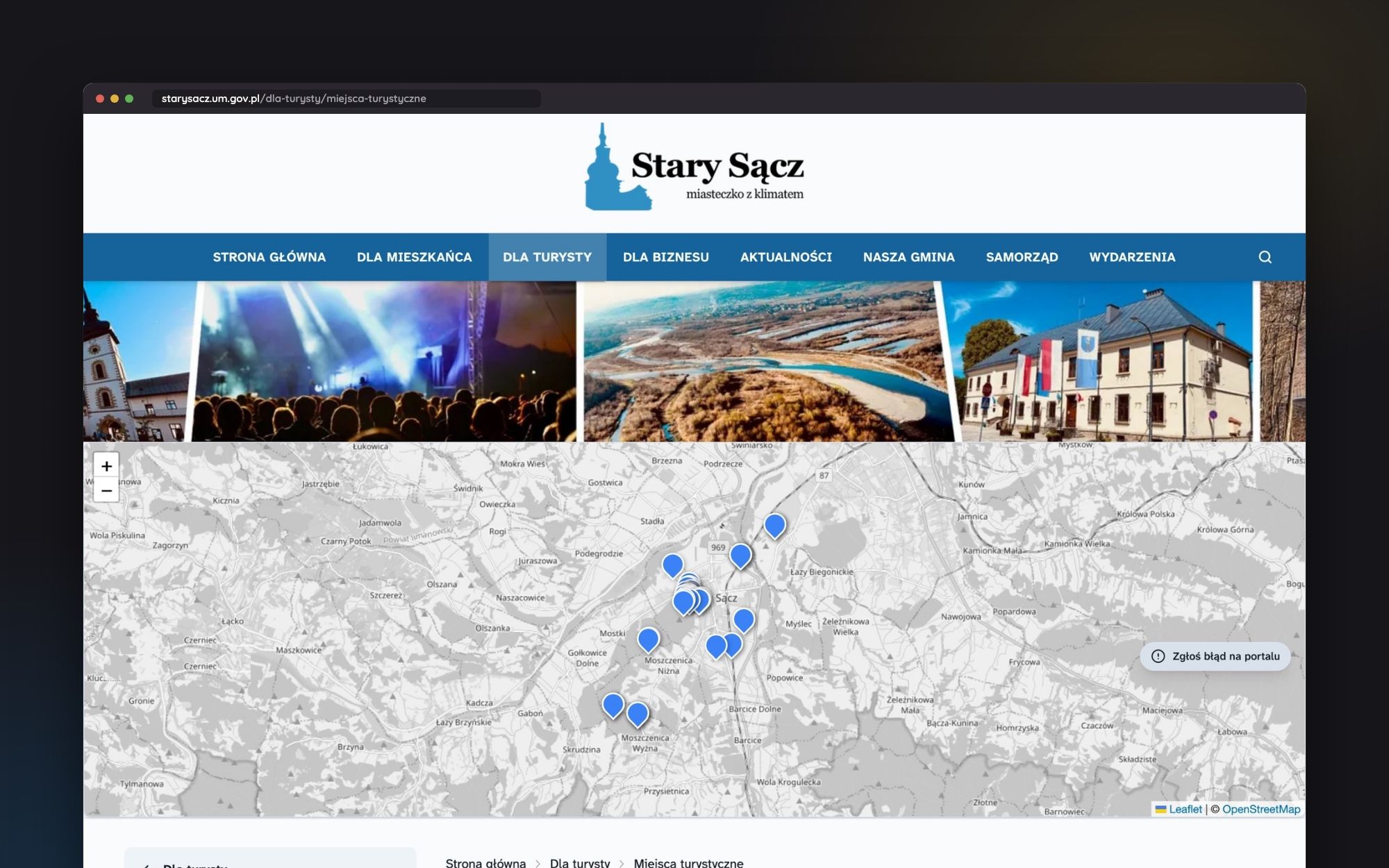
For the tourist, I built an attractions catalog with filters and a map. A local business can submit a location themselves through a form, and the editorial team moderates it. Tourist quests with QR codes lead to short URLs /q/code.
All the maps use Leaflet.js and OpenStreetMap, without relying on Google Maps. The map of the municipality displays sołectwa (village districts) as clickable areas, with spatial data managed by PostGIS.
News and Events
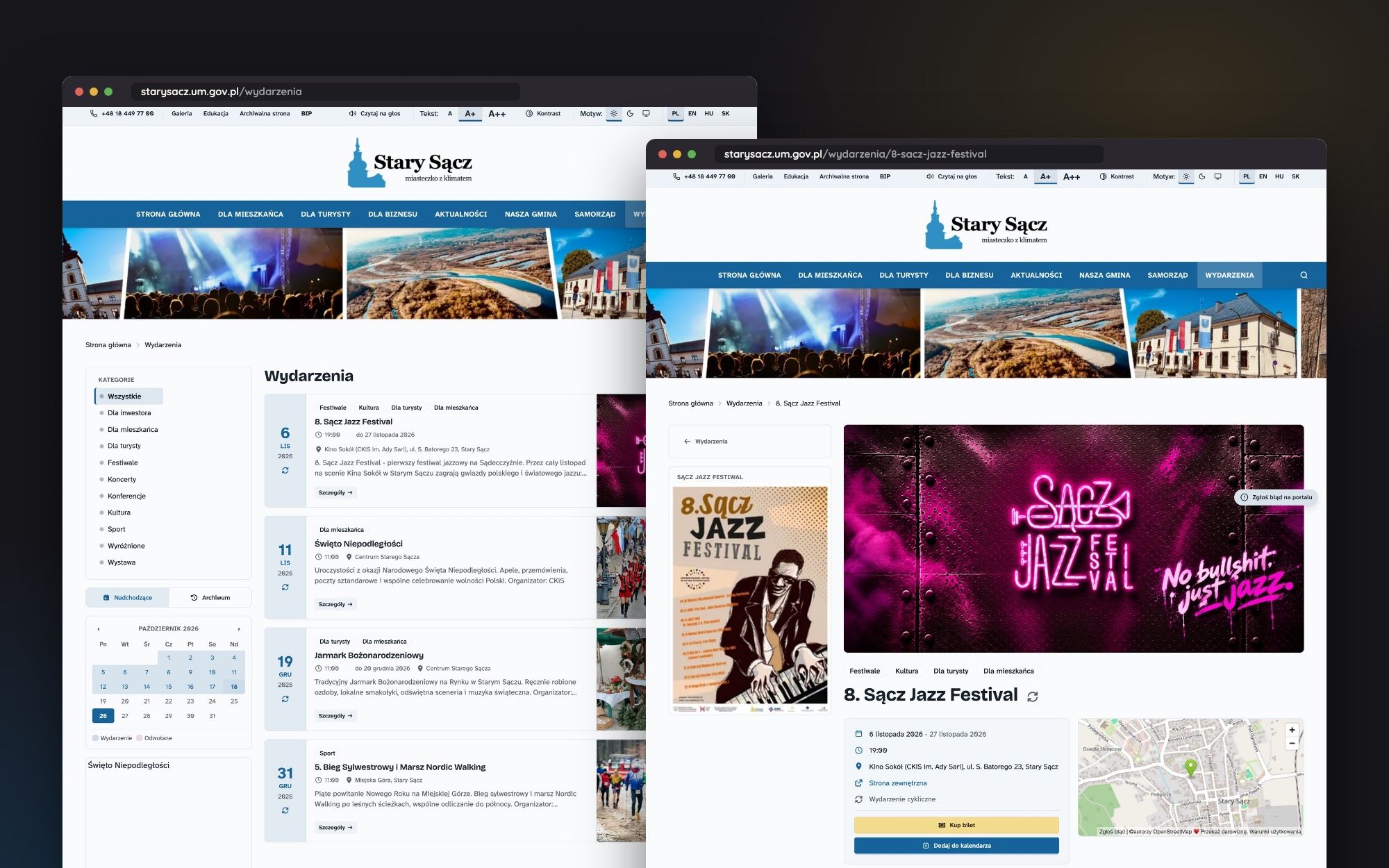
The News section has filters by categories and tags, with a link to the corresponding Facebook post under each article. The Event Calendar displays upcoming events and archives.
The event page includes a map for navigation, a button to purchase tickets, and an option to export the event to Google or Apple Calendar. Once the event is completed or cancelled, the ticket button disappears automatically.
Our municipality in data
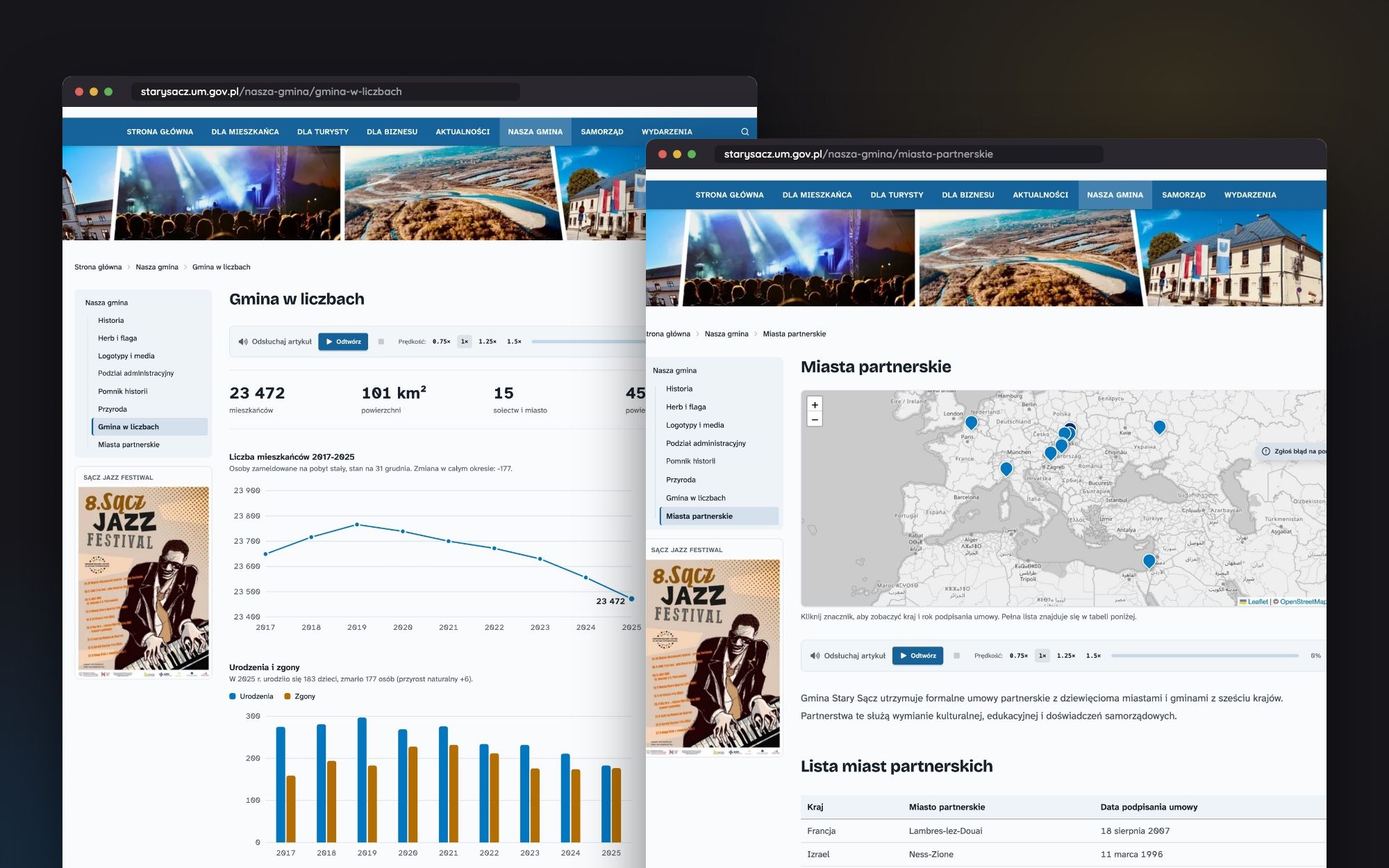
Instead of tables copied from reports, some pages display data directly. Gmina w liczbach (The municipality in numbers) features charts showing the population count as well as births and deaths. Miasta partnerskie (Partner cities) has its own map with the dates of agreement signings.
Residents also received an interactive waste collection schedule. Instead of searching for their district across dozens of PDF files, they can immediately see the dates for their street.
European Funds and Projects
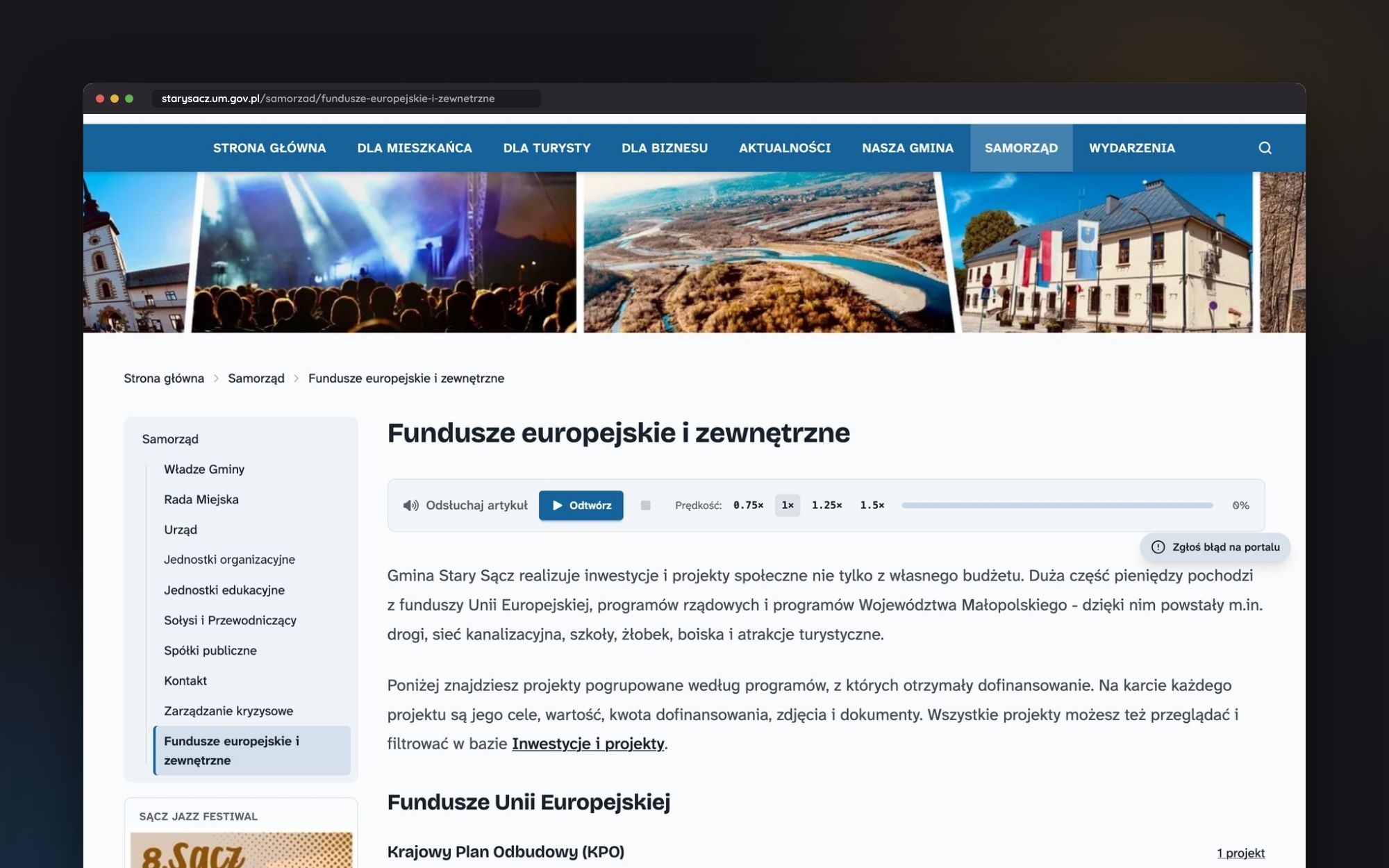
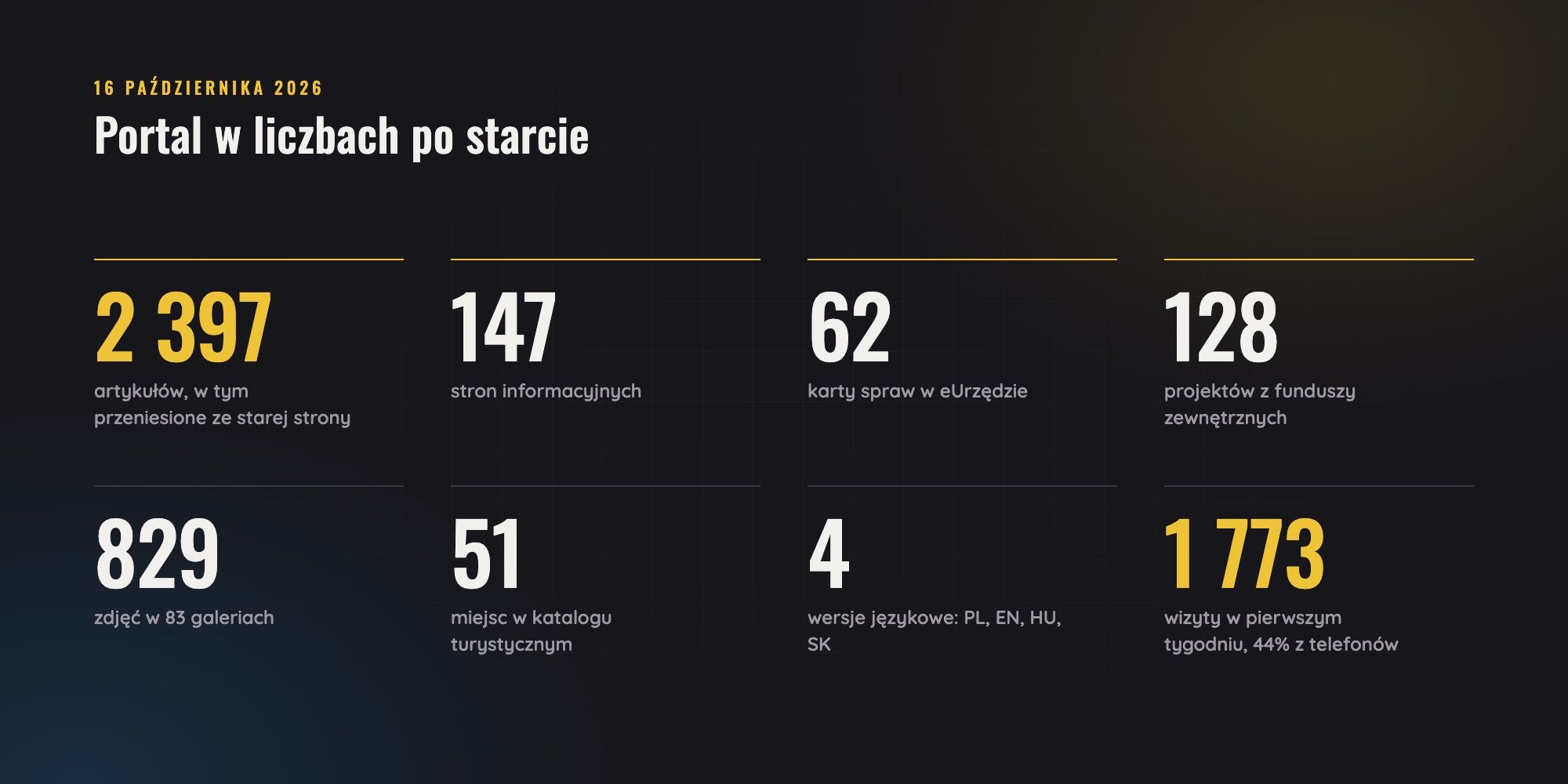
I migrated 128 projects financed from external funds from the old site. They are grouped by programs, ranging from RPO to Interreg. The project card displays objectives, value, grant amount, photos, and documents.
Accessibility as the foundation, not an addition
The Digital Accessibility Act leaves no room for choice: the municipal portal must meet WCAG 2.2 AA standards. Therefore, accessibility was a requirement from the first component, not a list of fixes at the end. In practice, this means:
- text contrast of at least 4.5:1, verified automatically,
- full keyboard support and visible focus on every element,
- clickable area of at least 24x24 pixels,
- semantic HTML5 with ARIA, tested with NVDA and VoiceOver screen readers,
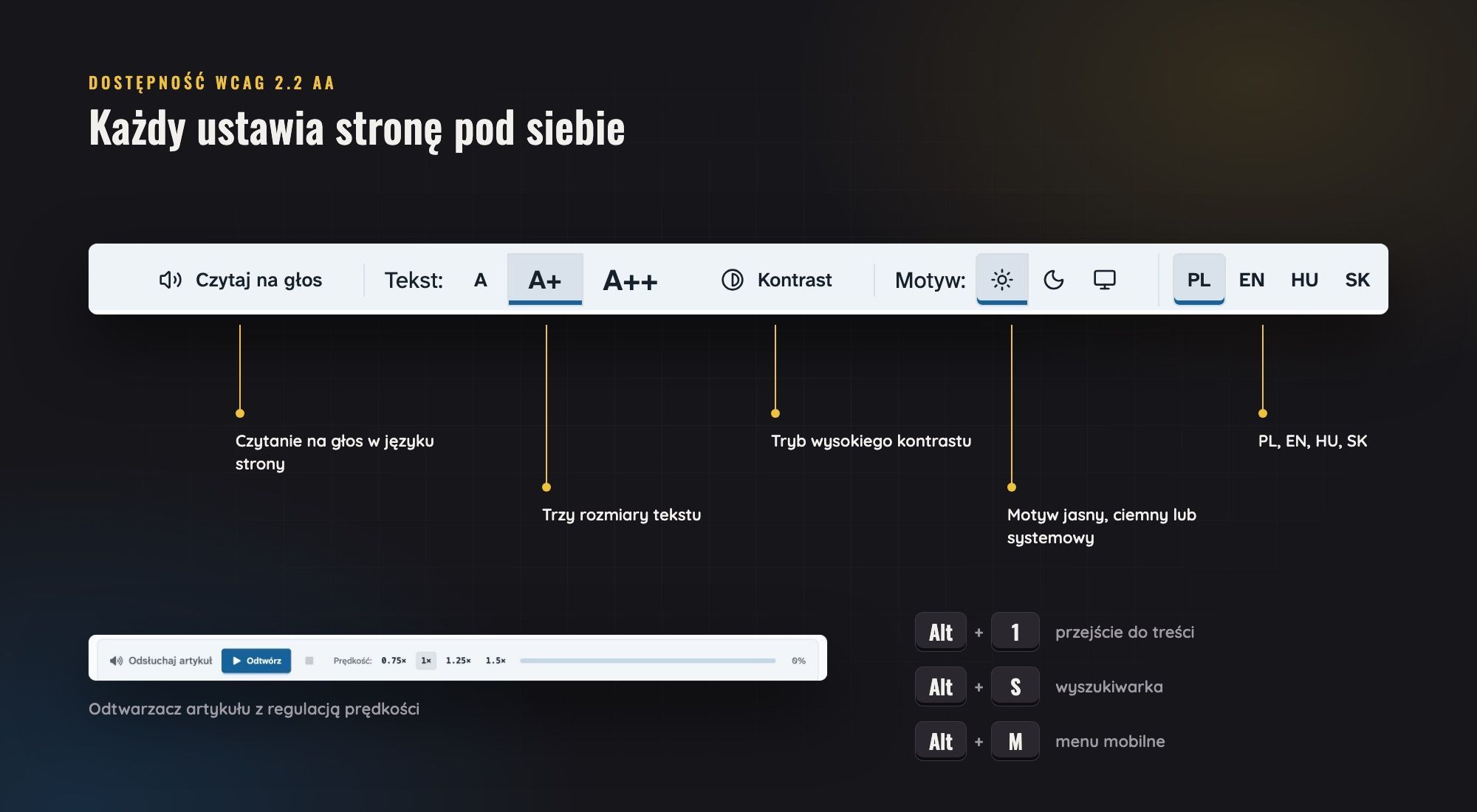
- three text sizes, high contrast mode and a dark theme,
- reading the content aloud in the language of the page, including English, Hungarian, and Slovak,
- keyboard shortcuts: Alt+1 for content, Alt+S for search bar, Alt+M for menu.
Accessibility also depends on what the editors input. That's why I prepared a guide for them on creating accessible content, which was published directly on the portal itself.
Editor's Dashboard
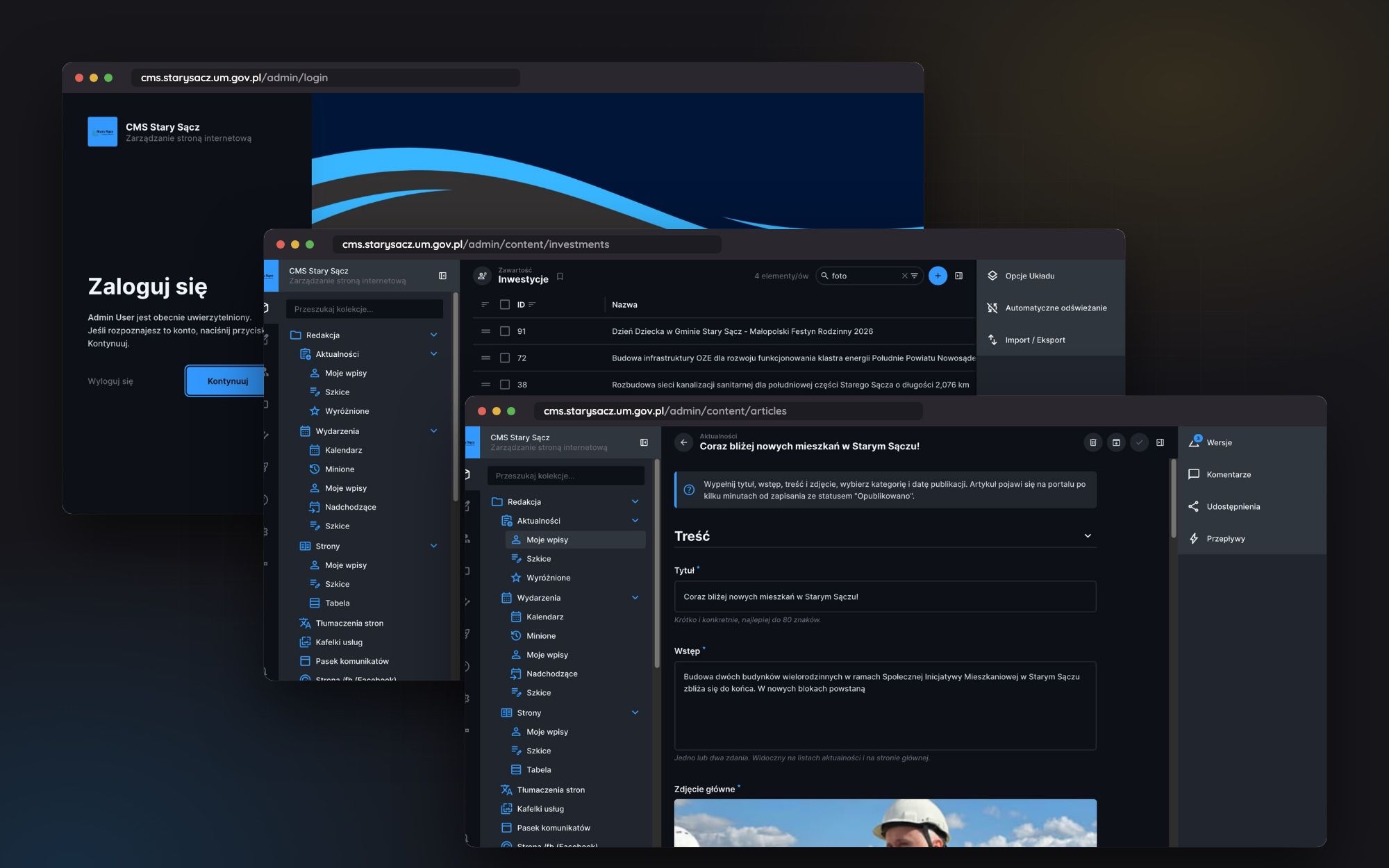
A portal is as good as the content it contains. That's why a lot of work went into the Directus admin panel, even though visitors will never see it. Editors received:
- a Polish interface with a description for each field and a hint on what to enter
- work-focused views: my posts, outlines, event calendar, drag-and-drop site map,
- automatic SEO descriptions generated upon saving,
- cleaning up formatting from text copied from Word before pasting it onto the website,
- email notifications about issues reported by residents,
- a register of addresses ending in a 404 error, with the option to add a redirection.
Security and independence from vendors
The second rule that ran throughout the project was: municipal data does not leave its own infrastructure. No Google Analytics, no external clouds, and no dependence on a single company.
The PostgreSQL database runs in an isolated Docker network with no port exposed externally. The container ports are blocked by the firewall, and only the reverse proxy is visible from the local network. Files are stored on a custom S3 server using MinIO.
The database backup is created automatically every night, with a 30-day retention period. Kuma monitors uptime, and visitor statistics are counted by Matomo on the municipality's server.
Public forms are protected by several layers at once: honeypot, submission limit per IP address, server-side validation, and real file type checking. The captcha is mCaptcha, a self-hosted proof-of-work mechanism, so nothing goes to Google reCAPTCHA.
Stack and license cost: zero Polish zlotys
The entire portal is built on open-source software. This means no licensing fees for the municipal budget and no long-term dependence on a single IT company for the office.
- Directus 11 as content panel and API,
- Astro 7 in SSR mode on Node.js generates pages,
- PostgreSQL 16 with PostGIS stores the data, including spatial data,
- Redis 7 accelerates caching,
- Meilisearch handles searching,
- Leaflet.js draws maps,
- TailwindCSS and DaisyUI build the interface,
- Docker Compose ties everything together into containers.
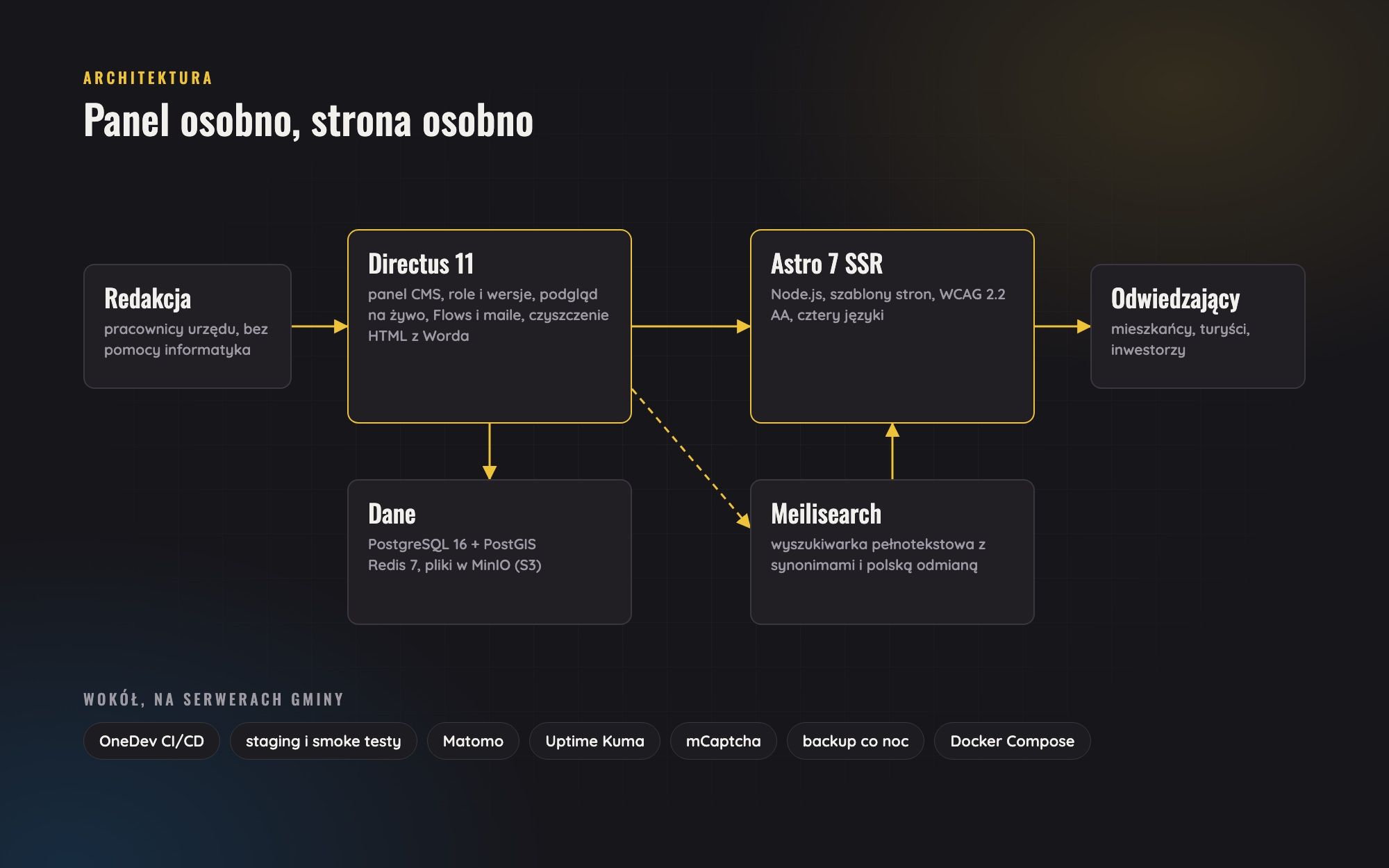
Deployments go through the own CI/CD pipeline in OneDev. Pushing to the repository triggers TypeScript type checking and deployment to the test server with a smoke test. Only the tagged version goes to production, and another smoke test checks if the site is working.
Moving from the old website
The new portal didn't start from scratch. I migrated over two thousand articles, galleries, and projects from the old WordPress using a script. Along the way, the content was cleaned up: Word junk, empty paragraphs, and dead links were removed.
The most attention was needed for the addresses. Old links from Google, Facebook, and partner sites couldn't lead nowhere. The portal therefore knows the map of 301 redirects from old addresses, and what wasn't moved opens in a WordPress archive under a separate domain.
After launching the project, every address that returns a 404 error is logged in the admin panel. The editorial team can immediately redirect it to the correct location.
I didn't build another municipal office brochure. I built a tool that residents, tourists, and officials use every day without thinking about the headless CMS running behind the scenes, custom infrastructure, or architecture compliant with WCAG standards.
- Aleksander Kowal
First week after launch
The first week after switching domains brought in 1773 visits. 62% of the traffic came from Google, and 44% were from phones. This confirmed that a mobile view can't be an afterthought.
The statistics also showed what residents were looking for. They typed in terms like KPO (National Recovery Programme), photovoltaics, or the names of villages, but the search engine wasn't yet aware of these projects. A few days later, the projects were indexed and the search engine was given synonyms and abbreviations for the most common phrases.
What's next
The portal is operational but not yet complete. Pending tasks include:
- eRada, which is the council members, committees and clubs, as a complement to the already completed website for sessions with live streams and recordings archive,
- a module for public consultations with documents and deadlines,
- newsletter hosted on my own server,
- a PWA app that can be installed on a phone without an app store,
- electronic applications with signatures.