
Programming
RCP: Time Tracking System for Municipal Offices
An RFID card reader data importer and attendance list, request, and report application for the Municipal Office in Stary Sącz. Without a new system: data goes to an intranet already used by the office.
20/10/2026
The Municipal Office in Stary Sącz has had an RFID card reader for work time registration for years. The problem was that the check-ins were stored in text files, and the HR team had to manually compile attendance lists from them.
Instead of buying a new system, I added two things to the existing reader: an importer that transfers the records to the intranet and an application where HR, supervisors, and employees can see attendance in their browser.
Importer: Text files to database
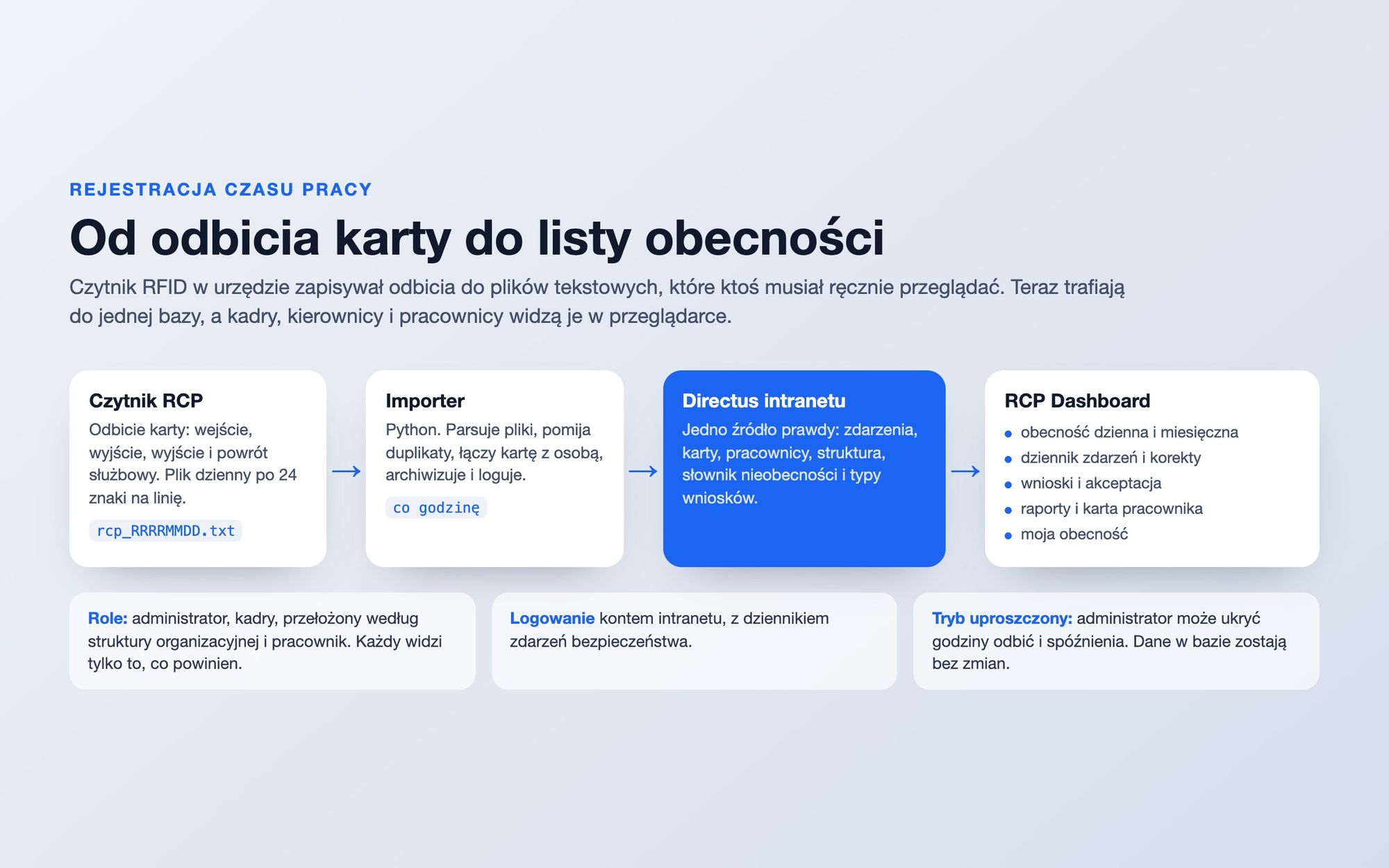
The reader writes each day to a separate file. Each line has 24 characters: the date, time without seconds, card number and event type - entry, exit, duty exit or return.
Python hourly importer:
- checks a directory with new files,
- parses lines and skips those already in the database, so re-reading the file doesn't duplicate anything,
- links the card number to an employee record,
- records events in the intranet's Directus system,
- moves the processed file to an archive and logs everything.
A separate script transfers files from the computer to which the reader is connected. No one needs to copy them manually anymore.
One source of truth
The data goes to the same Directus instance used by the office's intranet. It includes employees, organizational structure, positions, RFID cards, the absence dictionary, and types of requests. The RCP Dashboard doesn't have its own database; it simply builds an interface on top of these existing data sources.
RCP Dashboard
The application has separate views for different roles:
- daily attendance with switching between days using arrows,
- event log with manual timecard corrections by HR staff,
- conclusions: leave requests, official and private exits, overtime, requiring approval first from the supervisor and then from the office management,
- employee lists with export to CSV,
- reports: daily attendance list, monthly summary and employee card,
- my presence - the view for each employee with their own check-ins.
Permissions are derived from roles and the organizational structure. HR can see everyone, a supervisor can see their team, and an employee can only see themselves. Logging in is done via the intranet account, and security events are logged separately.
Simplified Mode
Implementing electronic time tracking in an office is also about people, not just technology. The administrator can temporarily hide the clocking-in times and tardiness markers in the application views. The data in the database remains unchanged, and HR continues to see and correct the actual values.
Why No Screen Shots
This is a system that records the attendance of specific individuals, so instead of screenshots, I'm showing a diagram.
Stack
- SvelteKit with a Node adapter and TypeScript
- Tailwind v4 and Flowbite Svelte (admin dashboard template),
- Direct access to the intranet through official SDK,
- file import and synchronization in Python,
- email notifications using Nodemailer,
- Docker.